
My Server: SSH & FTP
iPhone
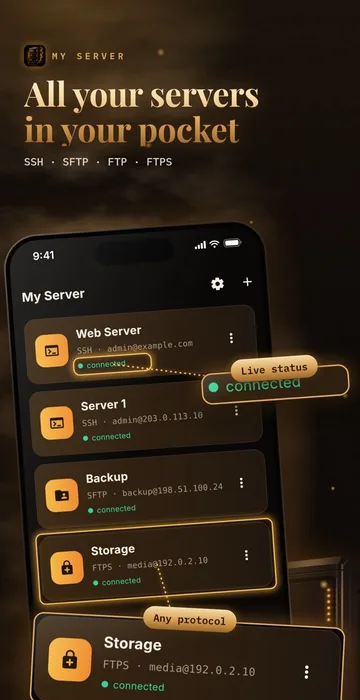
A simple, free app to work with your own servers over SSH, SFTP, FTP and FTPS — right from your phone.
Overview
My Server is a simple, free app to work with your own servers over SSH, SFTP, FTP and FTPS — right from your phone.
Files
- Browse folders with sizes, dates and sorting.
- Upload photos, videos and files; download, share or save files to your device.
- Create folders, rename, copy, move and delete (with confirmation).
- Thumbnails, photo viewer with zoom, video and audio playback.
- Text editor with syntax highlighting and an optional .bak copy before saving.
Terminal (ssh)
- xterm-256color terminal with Esc, Tab, Ctrl and arrow keys.
- Several sessions at once and command history.
Secure login
- Password or private key: paste or import OpenSSH, PEM RSA/EC, Ed25519 or ECDSA keys, with passphrase.
- Generate an Ed25519 key in the app and copy the public key or a ready authorized_keys command.
- Passwords and keys are kept only in the iOS Keychain. Choose “Remember” or enter them on every connect.
- Host key and certificate pinning warns you if a server’s identity changes.
- Optional Face ID / Touch ID lock.
More
- Light, dark or system theme.
- English, Russian, Azerbaijani, French and Italian.
Privacy
No account, no ads, no analytics, no tracking. The app connects only to the servers you add, and nothing is sent to the developer.
 Scanning — Smart Doc Scanner
 AllSend
 Smoke Player Dj
 T2B Beauty Salon Booking
 T2B Admin – Salon Manager
 Smoke Radio